Everything in WrapsDesigner.com is set up as a vector file or a high resolution raster image. No AI mockups anywhere.
Design vehicle wraps on the real vehicle, in 3D.
Show your customer the wrap on their actual vehicle, in any browser, before you print a single inch of vinyl.

Design on the metal,
not the mock-up.
Your artwork on their actual bodywork, curves and all, while you are still drawing it.


Each of these images created with WrapsDesigner.com tools. NOT AI!
Design the wrap in your browser and spin the customer's actual vehicle in front of them before a single inch of vinyl is printed. Not a flat outline and not a photo mockup: the actual vehicle in 3D, so you can see how your artwork sits on its real shape and how it reads from every angle.
Spin to any angle, and so can your customer. A proof, not a survey.
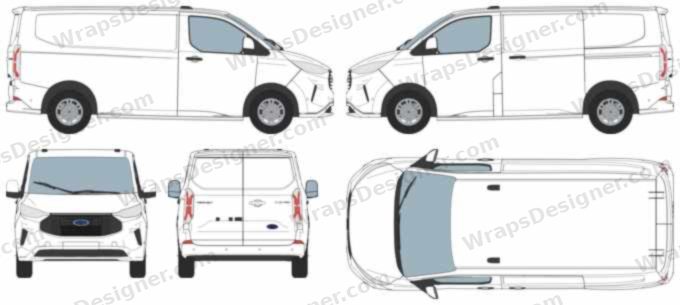
Ford Transit Custom outline. Exact, to scale, ready for Illustrator.
The 2023 on Transit Custom L1H1, drawn from the van itself and checked against Ford's own length, width, height and wheelbase. Right, left, front, rear and top on one vector SVG sheet at 1:20, with the body, glass, lights, wheels and panel shut lines all on their own groups. Open it and start designing. No tracing photos, no guessing where the door handle is.
A real editor, in the browser. Nothing to install.
Pick the vehicle, drop your artwork on it, and move it around on the body itself rather than on a flat outline. It runs in any browser, on whatever machine you happen to be sat at, and the thing you are looking at while you work is the same thing your customer approves.


* The studio is in prelaunch and under active development. What you see here works today.
Get in first when it goes live.
Design the wrap, then show your customer how it looks on their actual vehicle in 3D, in the browser, before you print a single inch of vinyl.
- The real vehicle in 3D, from any angle
- 1:1 print ready export
- Adobe Illustrator panel included
- Nothing to install
Real light. Real reflections.
Nothing here is a photograph with artwork pasted on it. One wrap, one vehicle, and every scene lit by that environment's own light, so the reflections and the shadows belong to the place instead of being faked on afterwards. The design is applied to the vehicle's own panels and rendered on the real body, which is why it follows the creases in the panels, breaks at the doors and turns the corner at the back.


Design on the vehicle. Or design in Illustrator. Same van either way.
You don't have to change how you work to get the result. Draw straight onto the vehicle in the browser, or keep Illustrator and put the van next to your artboard. Both finish at the same place: a 1:1 print pack, separated by panel.
Straight onto the vehicle
Pick the make and model, drop the artwork on and move it about on the actual panel. Text, logos, full colour runs. Nothing to install and nothing to learn. The vehicle is the canvas.

Keep the tools you already use
A live 3D vehicle sits beside your artboard and updates as you draw. Your files, your shortcuts, your plugins, untouched. One way only, so your document is never rewritten behind your back.

Three steps, whichever way you work.
Pick the vehicle
Choose the make and model and view it in 3D, the real body shape rather than a flat outline you have to imagine round a corner.
Design the wrap
Bring in the customer's artwork or build it here: text, decals, logos, full colour panels. In the browser or in Illustrator, either way you watch it land on the vehicle as you go.
Get the yes, then export
Spin it in front of the client, get the sign off, then export the 1:1 print pack and send it to whichever printer you like.
Start from a design, not a blank artboard.
Most jobs do not start with a clear idea. There is a library of ready designs built for the trades, so you can put something on the vehicle in seconds and change it from there. Search by trade, by colour or by style, drop one on, then move it, recolour it and put your own name on it. Nothing is locked.


Every one of these is a real render, not a stock mockup. The artwork sits on the vehicle's own panels, so what you see is what gets printed.
Every design is included with your subscription. Use any of them on as many jobs as you like, for as many customers as you like. No per design charge, no licence to buy, no royalties and nothing extra to pay when the job is a big one.
Every angle, rendered properly. Usually back inside a minute.*
Press render and our machines do it, not your laptop. You get the full set of angles of the actual vehicle with your artwork on it, front, both flanks, rear, the three quarters, as real renders, not a flat preview with a picture stuck on top.
The whole set, every time. Not one hero shot you then have to explain round the back.
Nothing to install and nothing to melt. An old laptop gets the same renders as a new workstation, because it isn't doing the work.
Quick enough to change something and render it again while the customer is still sat there.
* Usually. It depends on how busy the render machines are and how heavy your design is. At a busy moment you may wait a bit longer.
You already picture it on the van.
Nobody imagines a wrap as a flat side on drawing. You see it on the vehicle: running over the curve of the side, round the back, how it reads from the kerb. Then you flatten it onto an outline to draw it, and your customer has to un flatten it in their head to know what they are buying. Two guesses. The reprint is where they meet.

“the owners complained that things didn’t look like the drawings.”
“That’s not what I approved.”
Spin the vehicle. Get the yes. Then print.
The proof is the real vehicle, not a flat side on drawing. Your customer turns it round, looks at the back, sees how the artwork wraps round, and approves what they're actually going to get.
They can look at it on their phone *
Send a link. They view a full 360 degree vehicle design at home instead of trying to picture a flat PDF, and they can show it to whoever else has to say yes.
It's the same link every time *
Change the design and tell them to refresh. No emailing proof_v2, then proof_v3_FINAL, and no one arguing about which version they were looking at.
You see it on the real shape
Artwork that looks right flat can look wrong on a curved body. You find that out while you're designing, instead of on install day.
You get changes you can act on
"Move the logo up a bit" instead of "it just doesn't look right".
They approve what they actually get
What the customer signed off is what comes off the printer.
* The client proof link is being built now and is not live yet. Everything else on this page works today.
Everything a wrap and sign maker needs.
Every outline template, included
A true 1:20 outline for every vehicle in the library, measured rather than traced off a photo, so the panels are where the panels actually are. Most shops pay a separate subscription for this on its own. Here it comes with the vehicle, and you are not buying a whole catalogue because you needed one van.
The design lands on the vehicle as you work
Not a flat canvas you interpret afterwards. Every change shows on the body as you make it, so you are never designing blind and making adaptations later.
Print ready, panel separated
1:1 output, colour managed, laid out the way a large format printer expects it. Take it to any shop you like.
Real text, not a raster
A proper vector text engine with 2D and 3D effects, and over 2,000 fonts, so lettering stays crisp at any size instead of turning to mush on a full side panel.
One artwork, not two
The usual way is a Photoshop mockup for the client and a separate rebuild in the template for the printer. Here both come out of the same file.
Turn it right round
Thirty angles through a full turn, not three fixed views. Drag it round to the quarter that matters and see how the artwork carries across the body.
Export as often as you like
No render credits and no export budget to watch. Redo a panel, change your mind, send the printer a corrected pack an hour later. Fair use, not a meter.
Pick it up where you left it
Designs save to your account, so the one you started at the shop opens on the laptop at home with the artwork and the vehicle exactly as you left them.
Customer artwork, handled
Bring in SVG, PDF, AI or PNG. What arrives is rarely production ready, so you see it on the vehicle, and see how it vectorises for print, before you commit any vinyl.

It runs on whatever you already have.
No graphics card, no expensive hardware required. Not a cut down fallback, the whole thing: the same studio, the same proof, on the device you have available, including mobile and tablets.
- Runs in
- Any modern browserChrome, Safari, Edge, Firefox
- Graphics card
- Not requiredBuilt from the ground up to work without one - in ultra photorealism
- To install
- Nothing to install, except the Adobe Illustrator plugin if you decide to use it (fits into your current workflow)
- Works on
- The office laptop, the old workshop PC, a MacBook, a Chromebook, a phone at the vehicle
- Your client needs
- A linkthe same one every time, nothing to download, nothing to sign up for
- Billing
- Monthly, cancel any time, no lock ins
A live 3D vehicle, inside Adobe Illustrator.
Included in the plan, landing shortly. The browser studio installs nothing. This is the one exception, and it is optional: a real Adobe extension, not a web app pretending to be one. Install it and a live 3D vehicle sits beside your artboard: you draw, it updates. Nothing else does this, and you keep every tool, shortcut and file you already use.
- →Drop a region onto your artwork and the link is made. That's the whole setup.
- →Live as you draw, one way, Illustrator to vehicle. Your document is never rewritten behind your back.
- →Spin it in front of the client without leaving Illustrator, then export the 1:1 print pack.

One plan. Monthly, cancel any time.
One plan, everything included. You keep the print ready files and take them to whichever printer you like.
| £25/moEverything, one designer. | |
|---|---|
| Browser studio and 3D proof | Yes |
| Full vehicle library | Yes |
| Outline template with every vehicle (1:20, no extra charge) | Yes |
| 1:1 print ready export (unlimited, fair use) | Yes |
| 2,000+ fonts as live vector text | Yes |
| Priority on new vehicles | Yes |
| Adobe Illustrator extension (live 3D vehicle beside your artboard) | Included, coming soon |
| Get started |
The questions every shop asks first.
How accurate is it? I have measured enough vans to be sceptical.
You should still survey the vehicle as no template on the market fits every body variant and we aren't claiming otherwise. What this gives you is the real vehicle in 3D rather than a flat outline, so you can see how the design sits on the real body shape and how it reads from every angle, while it's still cheap to change.
Do I need to install anything, or buy powerful computers?
No. The 3D runs without a graphics card, so the studio works on the laptop in the office, the old PC in the workshop or a phone at the vehicle. Nothing to install, nothing to maintain.
Can a browser tool really produce print ready output?
Yes. Exports are 1:1, panel separated and colour managed, laid out the way a large format printer expects them. Ask for a sample pack before you pay us anything and run it through your own RIP.
Can I bring in artwork the customer sent me?
Yes, as SVG, PDF, AI or PNG. Customer artwork rarely arrives production ready, so the studio shows you what you actually have before it costs you a reprint.
How do revisions work?
You change the design and the customer refreshes the page. It's one link that always shows the current version, so there's no emailing a new PDF for every tweak and no chance of them signing off something you've already moved on from.
What if the vehicle I need isn't in the library?
Tell us which one. We build it. Subscribers jump the queue.
What about the AI wrap generators?
AI produces a picture of a wrap, not a wrap: no vector, no panels, no bleed or overlaps, and a vehicle that only approximately matches the one on your forecourt. Fine for a mood board. Useless at the RIP. We wrote about why in detail.
Who owns the files?
You do. Export the print ready pack and take it to whichever printer or shop you like.